One file, hundreds of millions
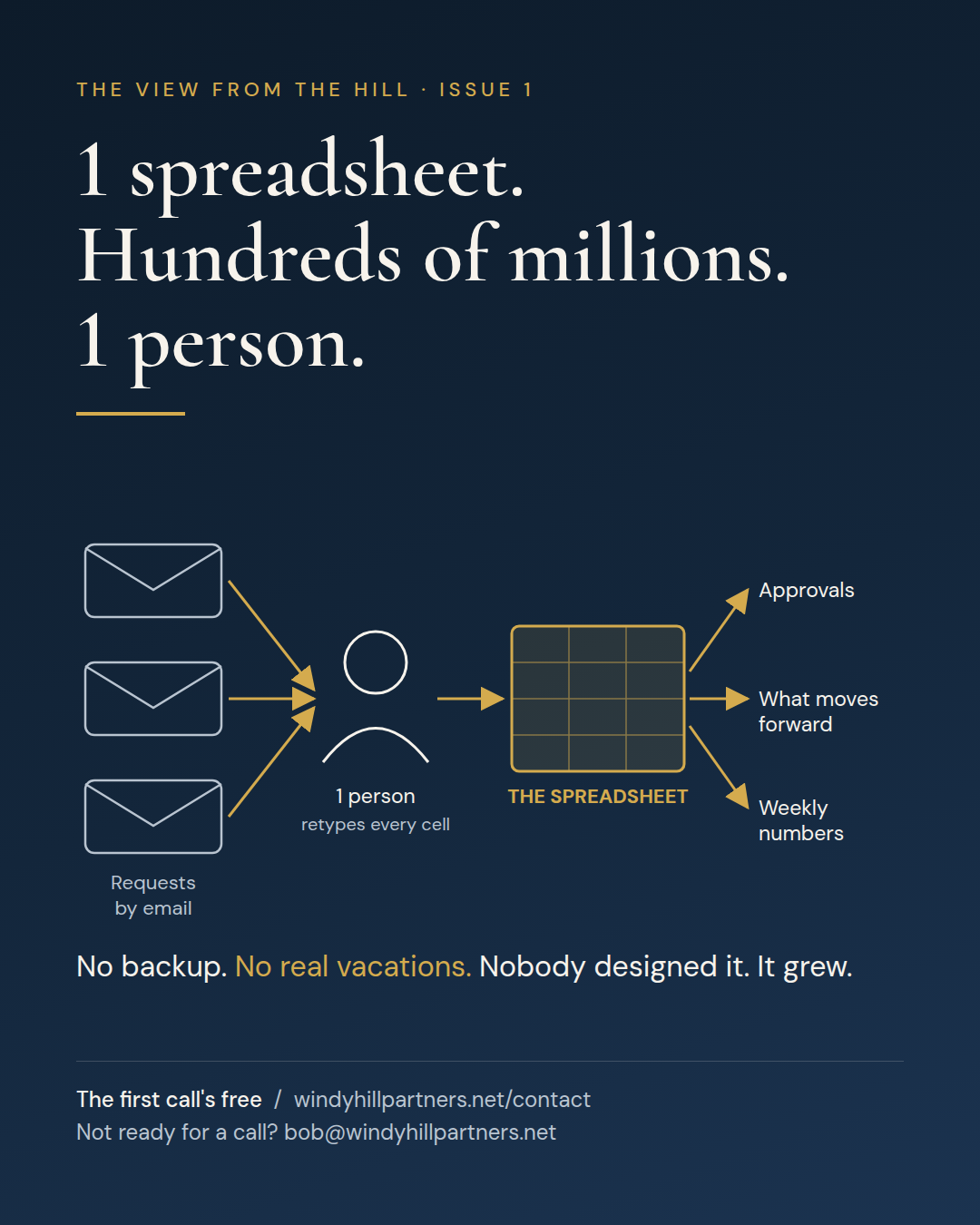
There’s a spreadsheet at a company you’ve heard of. There may be one at yours.
Hundreds of millions of dollars of business ran through it. Not a system. Not a platform someone bought after a long selection process. One spreadsheet.
Here’s how it worked. Requests came in by email. Someone opened each email, read it, and retyped the details into the spreadsheet, cell by cell. Then the spreadsheet drove everything downstream: what moved forward, what got approved, and what leadership saw in the weekly numbers.
One person owned it. They knew which columns meant what, which formulas broke if you sorted wrong, and which tab was the real one. There was no backup. I don’t mean a file backup. I mean a human one. Nobody else could run it. That’s key person risk in its purest form.
So that person didn’t take real vacations. They took laptop vacations. They checked email from the beach, because if they didn’t, the business stalled.
Nobody designed this, and that’s the part worth sitting with. No one in a meeting ever said, “Let’s run a few hundred million through a file that one person maintains by hand.” It started as a quick tracker. Then people started relying on it. Then everything did.
When I told this story to a colleague at another firm, they didn’t laugh. They topped it. Their version had $2 billion running through a spreadsheet.
If a specific file came to mind while you read that, keep going.
Why the usual fixes fail
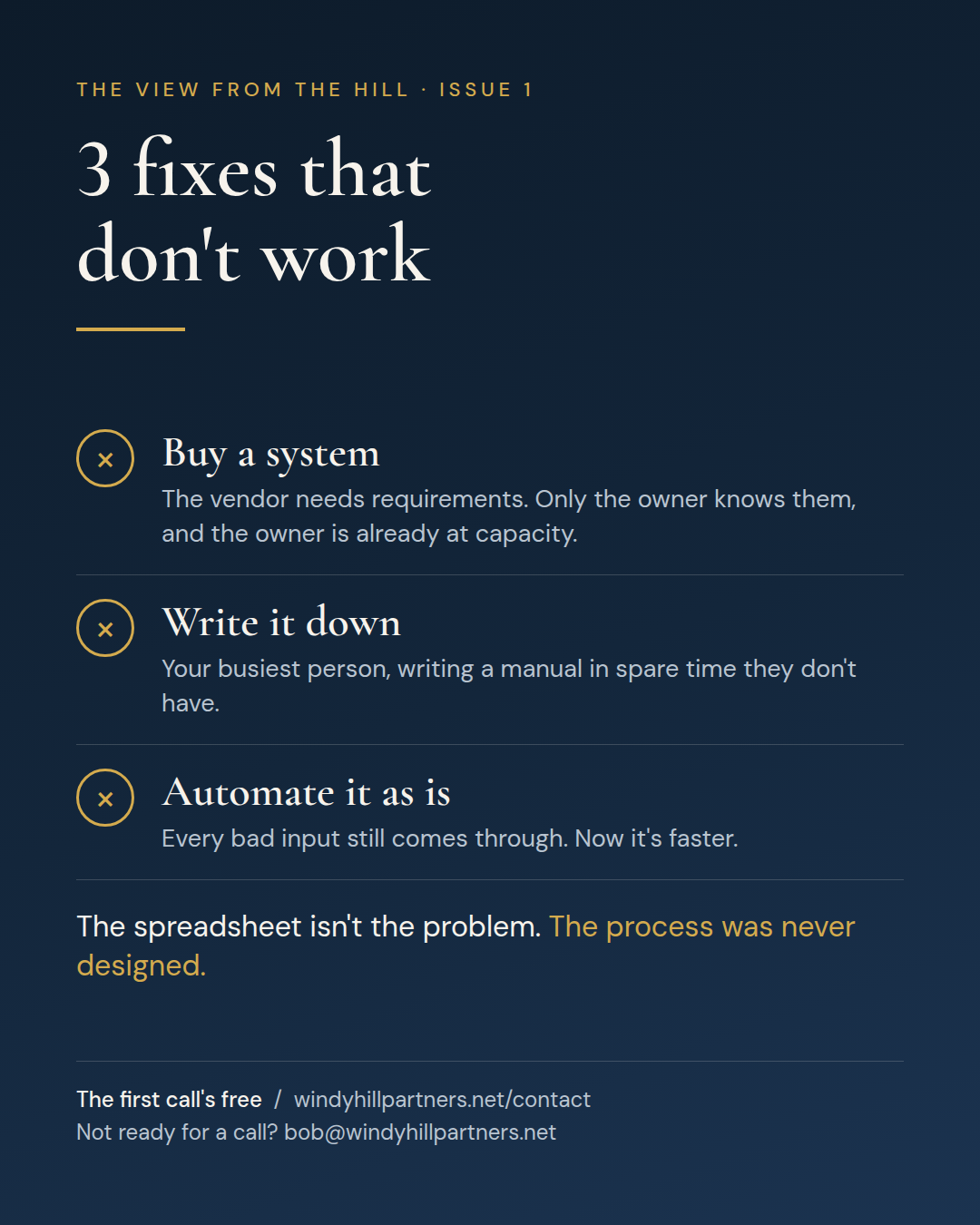
Most organizations know about their spreadsheet. They’ve usually made at least one run at fixing it, and it tends to go one of 3 ways.
Buy a system. Someone scopes a workflow platform or a module of the ERP. The vendor needs requirements. The only person who knows the requirements is the one who owns the spreadsheet, and they’re already at capacity. The project stalls, and the spreadsheet keeps running the business while everyone waits.
Tell the owner to write it down. Good instinct, wrong ask. You’re asking the busiest person in the building to write a manual in spare time they don’t have. You’ll get a 4-page doc that’s out of date by next quarter.
Automate it as it is. This is the dangerous one. Someone builds a flow that copies the emails into the spreadsheet on its own. The retyping goes away, so it feels like a win. But nothing underneath changed. Every bad input, every exception, every workaround still flows through, faster now and with fewer human eyes on it. You haven’t fixed the mess. You’ve put it on a conveyor belt.
All 3 fail for the same reason. They treat the spreadsheet as the problem, and it isn’t.
The view from the hill
The spreadsheet is a symptom. The problem is that the process was never designed, so a person became the design.
Look at what that file is doing. It’s the intake system, the database, the approval log, and the reporting layer, all at once. Nothing else was built to do those jobs, so one smart, dedicated person did them by hand. That isn’t a failure of the person. It shows how good they are. They’ve been holding up a part of the business nobody ever drew on the org chart.
Now put it in money terms, because that’s how it needs to reach the COO and the CFO.
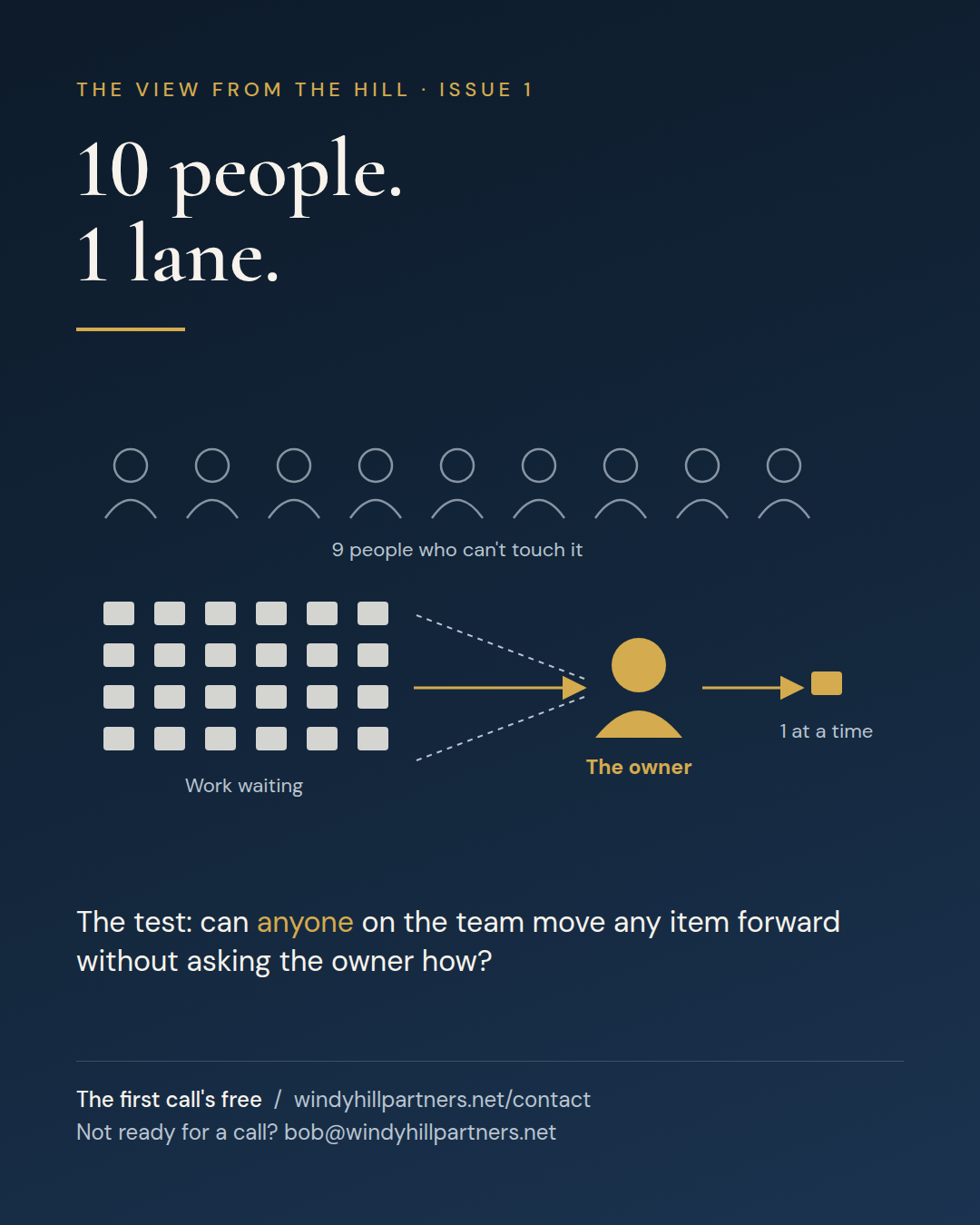
- A bottleneck, in the truest sense. One person means one lane. Every item waits for the same pair of hands, no matter how many people are on the team. When volume spikes, nobody can pitch in, because nobody else can touch it. The whole operation moves at the speed of one inbox.
- Key-person risk. If that person leaves, gets sick, or wins the lottery, how many days until the business notices? For most spreadsheets like this one, the honest answer is 1 or 2.
- Error cost. Every hand-typed cell is a chance to flip 2 digits. On hundreds of millions of dollars, a small error rate isn’t small.
- Hidden labor. The retyping never shows up as a line on the P&L. It hides inside one salary, spent on work that isn’t the job that person was hired to do.
- Blind spots. Leadership sees whatever the spreadsheet says. Nobody can check it without the owner.
None of these has its own budget line, which is why the spreadsheet survives every cost review. It looks free. It’s one of the most expensive things in the building.
What to do Monday
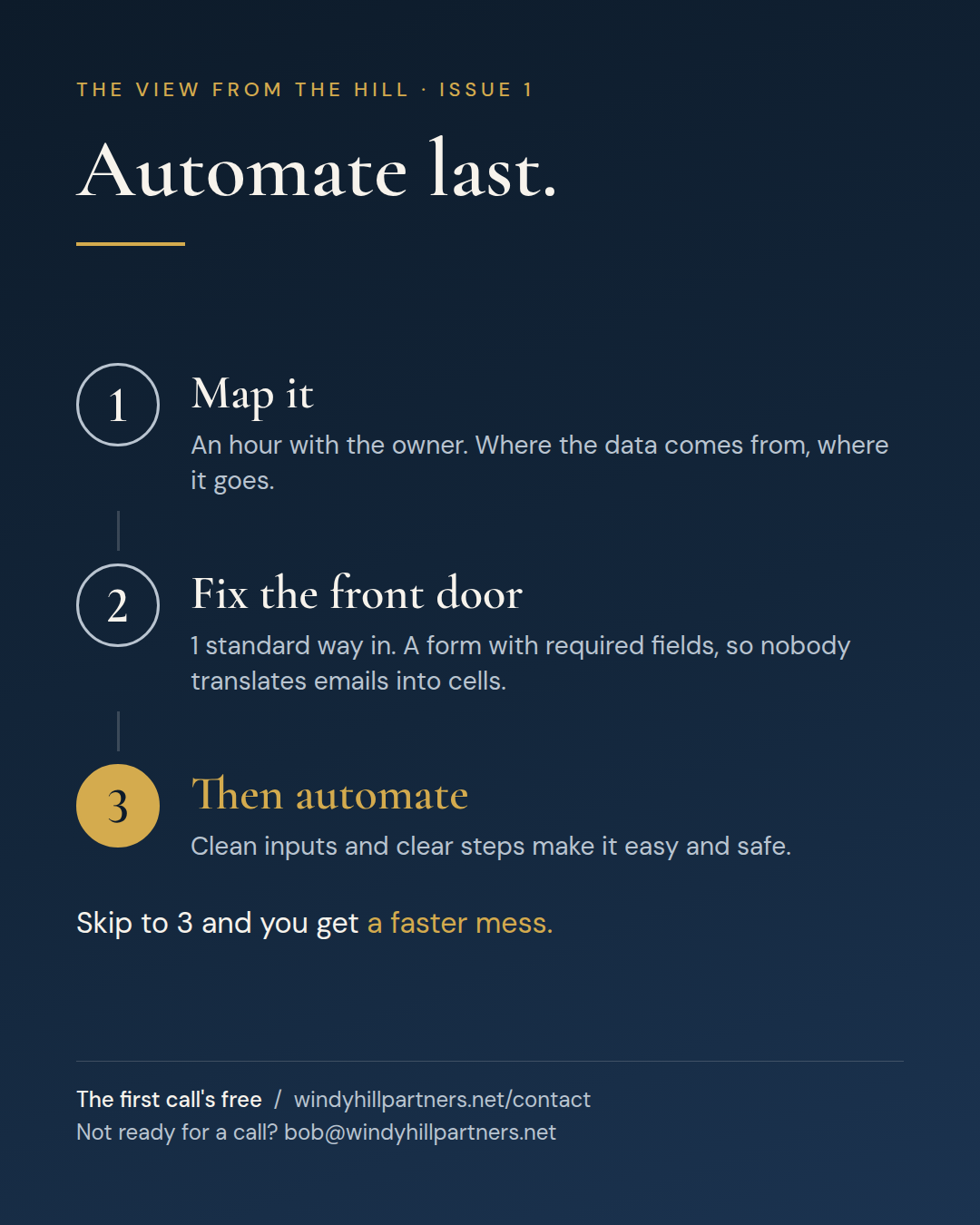
You don’t need a transformation program to start. You need 3 moves, in this order.
1. Map it before you touch it. Sit with the owner for an hour. Draw where the data comes from, what happens to it, and where it goes: inputs on the left, the spreadsheet in the middle, every person and report that depends on it on the right. You’ll find steps nobody knew existed. That’s the point.
2. Fix the front door. In this story, the pain started with email. Requests showed up in every format imaginable, and someone had to translate each one into cells. Give requests one standard way in, a form with required fields, and you remove the translation step. That step is where a lot of the errors start.
3. Then automate, and not before. Once the inputs are consistent and the steps are clear, automation gets easy and safe. Here, the fix was SharePoint and some automation. Nothing exotic. The retyping stopped. The data landed where it needed to go without anyone rekeying it. And one excellent employee got their life back, real vacations included.
Here’s how you know you’re done. Can anyone on the team pick up any item and move it forward, without asking the owner how? If yes, the bottleneck is gone. If only the owner and one trained backup can do it, you’ve made the line 2 people long. Better, but still a line.
That last result is the one I’d put on the scoreboard. The dollars matter. But a business that depends on one person never taking a day off isn’t a stable business. It’s a lucky one.
Notice what’s missing from that list: someone like me running it for you forever. Your team can own all 3 moves. The goal is for them to do it again on the next spreadsheet, and the one after that. There’s always a next one.
Before you automate anything
If you’re eyeing your own spreadsheet and thinking about automation, check whether the process is ready first. Our free Automation Readiness Score asks the questions that separate “automate it” from “fix it first.” Is there one source of truth? Does every exception have a named owner? Do you have a baseline to measure against afterward? It takes a few minutes, and you don’t have to talk to anyone.
If you’d rather talk it through, I’d enjoy that. Tell me about your spreadsheet. Everyone has one, and I’ve yet to hear 2 that were the same. Book a free call.
The View from the Hill comes out once a month. Bob Buckwalter is a Master Black Belt and the principal of Windy Hill Partners, a business transformation firm in the Philadelphia area that fixes processes and leaves your team able to keep fixing them.